Local Apple Log Conversionتحويل Apple Log محليًا
Converts Apple Log footage into a Rec.709-style preview.يحوّل لقطات Apple Log إلى معاينة بأسلوب Rec.709.
Convert flat Apple Log footage into a clean Rec.709 preview, apply cinematic LUT styles, fine-tune contrast and sharpness, and save the finished video directly to your Camera Roll.حوّل لقطات Apple Log المسطّحة إلى معاينة Rec.709 واضحة، وأضف أكثر من 13 نمط LUT سينمائيًا مجانيًا، واضبط التباين والحدة، ثم احفظ الفيديو النهائي مباشرةً في ألبوم الكاميرا.
CineLog uses a cinematic lens-inspired icon designed for mobile filmmakers and Apple Log workflows.يستخدم CineLog أيقونة مستوحاة من عدسة سينمائية ومصممة لصنّاع الأفلام على الهاتف ولسير عمل Apple Log.
Preview import, Rec.709 conversion, LUT styling, contrast and sharpness controls, before/after comparison, and Camera Roll export.استعرض الاستيراد وتحويل Rec.709 وأنماط LUT والتحكم بالتباين والحدة والمقارنة قبل وبعد والتصدير.
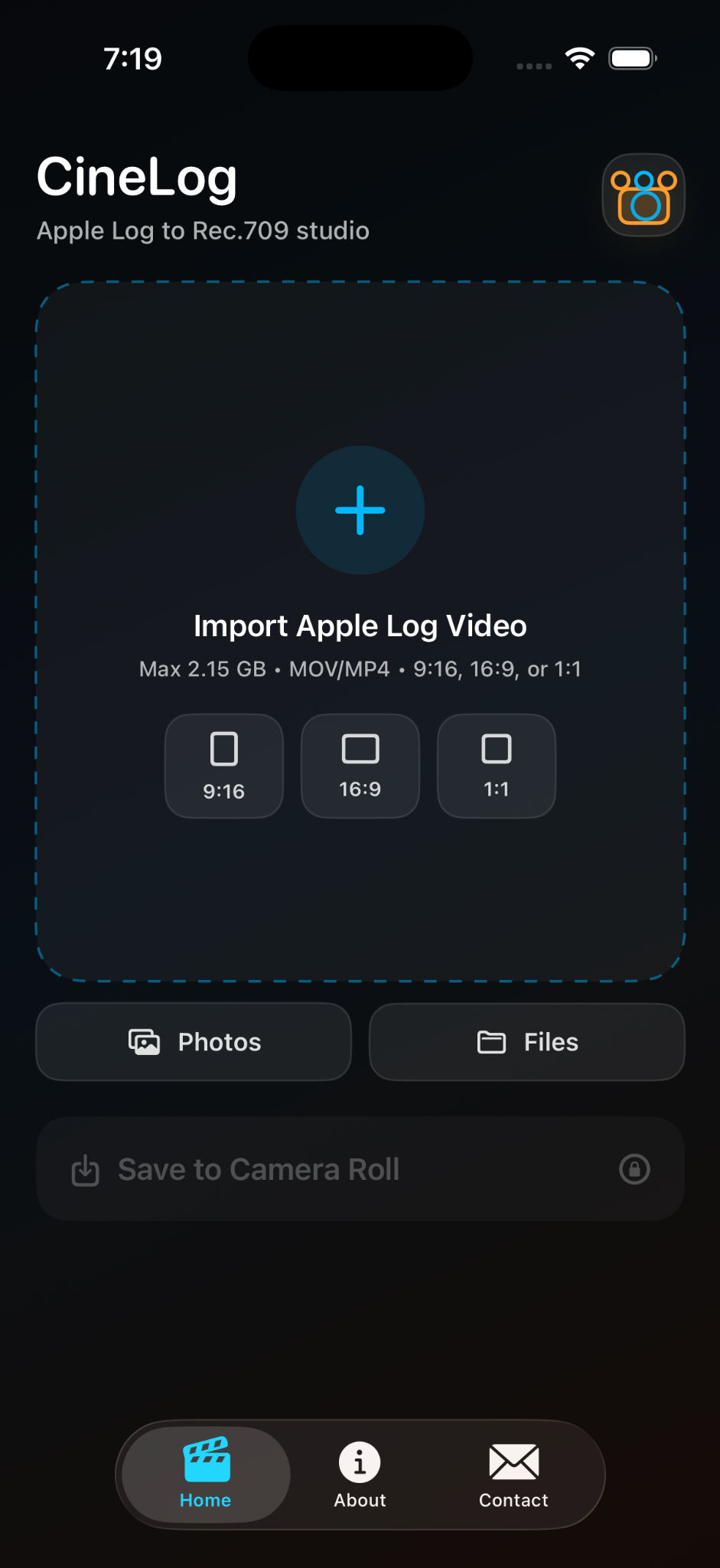
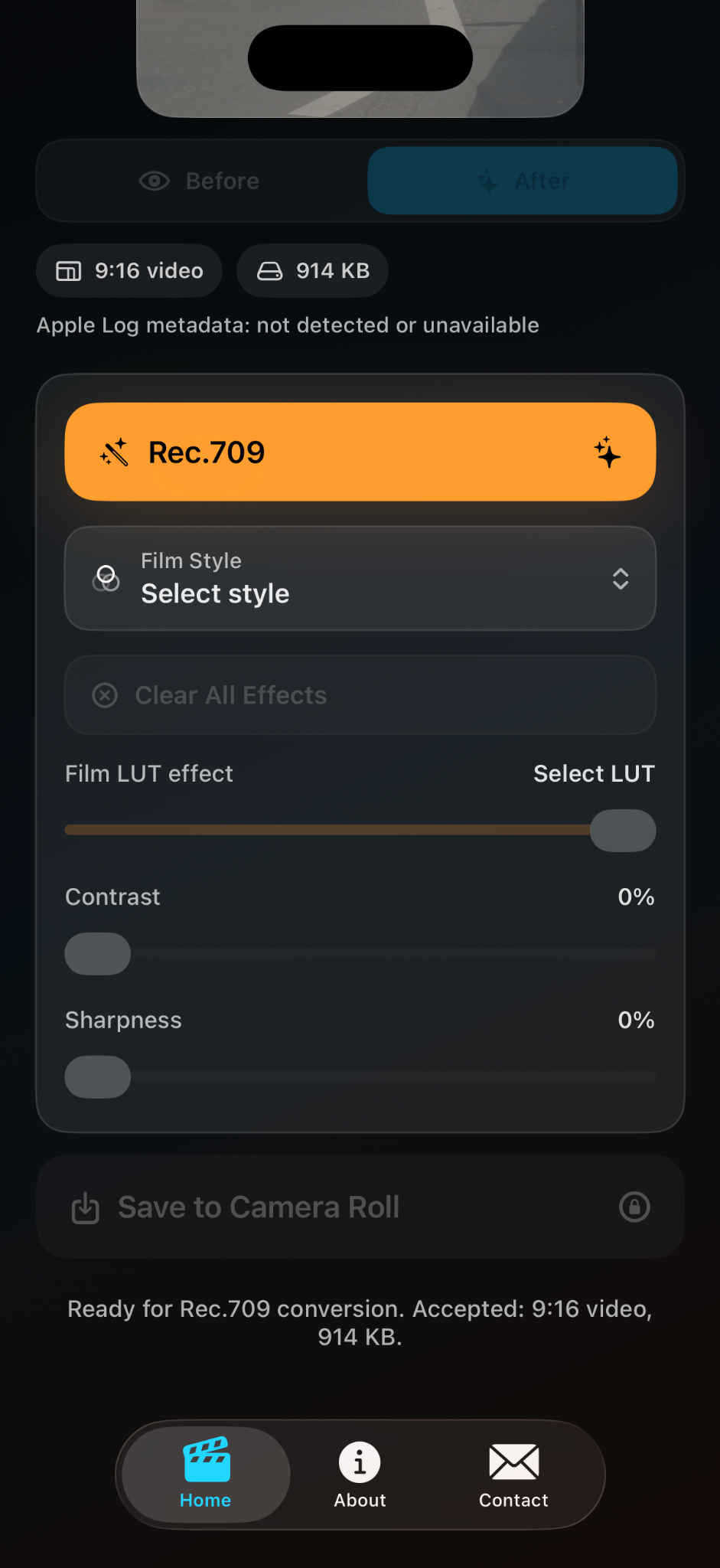
Converts Apple Log footage into a Rec.709-style preview.يحوّل لقطات Apple Log إلى معاينة بأسلوب Rec.709.
Built-in styles with strength control from 0% to 100%.أنماط مدمجة مع تحكم بالقوة من 0% إلى 100%.
Fine-tune contrast and sharpness after grading.اضبط التباين والحدة بعد المعالجة.
Compare the original with the graded result.قارن الفيديو الأصلي بالنتيجة المعالجة.
Save finished video directly to the iOS Photo Library.احفظ الفيديو النهائي مباشرةً في مكتبة صور iOS.
CineLog respects your privacy and processes videos locally on your device.يحترم CineLog خصوصيتك ويعالج الفيديو محليًا على جهازك.
CineLog does not collect personal information from users.لا يجمع CineLog معلومات شخصية من المستخدمين.
CineLog accesses only the video you select for local preview, Rec.709 conversion, LUT styling, contrast and sharpness adjustment, and export. CineLog does not upload, remotely store, sell, share, track, or save hidden background copies of your videos.يصل CineLog فقط إلى الفيديو الذي تختاره للمعاينة والتحويل والمعالجة والتصدير محليًا. لا يرفع CineLog فيديوهاتك أو يخزنها عن بُعد أو يبيعها أو يشاركها أو يتتبعها أو يحفظ نسخًا خفية منها.
Photo Library access is requested only to import selected videos and save exports to Camera Roll. Files access is limited to the file you select.يُطلب الوصول إلى مكتبة الصور فقط لاستيراد الفيديو المختار وحفظ النتائج، ويقتصر الوصول إلى الملفات على الملف الذي تحدده.
All video processing is performed locally using iOS media and image-processing tools. No internet connection is required for the core conversion workflow.تتم معالجة الفيديو محليًا باستخدام أدوات iOS، ولا يلزم اتصال بالإنترنت لسير التحويل الأساسي.
CineLog does not collect analytics, advertising identifiers, location data, contact information, browsing history, search history, user content, or usage data. It does not track users across other companies’ apps or websites or share data with ad networks, analytics providers, or data brokers.لا يجمع CineLog التحليلات أو معرّفات الإعلانات أو الموقع أو معلومات الاتصال أو سجل التصفح والبحث أو محتوى المستخدم أو بيانات الاستخدام، ولا يتتبع المستخدم عبر تطبيقات أو مواقع أخرى ولا يشارك البيانات مع جهات إعلانية أو تحليلية.
CineLog is not designed to collect information from children. Because it does not collect personal data, no children’s personal information is knowingly collected.لم يُصمم CineLog لجمع معلومات من الأطفال، ولا يتم عن علم جمع أي معلومات شخصية تخصهم.
Local processing without media uploads reduces remote exposure risk. Users remain responsible for videos stored on their device and their iCloud or Photo Library settings.تقلل المعالجة المحلية دون رفع الوسائط من خطر الانكشاف عن بُعد، ويبقى المستخدم مسؤولًا عن الفيديوهات وإعدادات iCloud ومكتبة الصور.
This policy may be updated from time to time. Changes will be posted here with an updated effective date.قد تُحدّث هذه السياسة من وقت لآخر، وستُنشر التغييرات هنا مع تاريخ سريان محدّث.
For privacy questions, support, or bug reports:لأسئلة الخصوصية أو الدعم أو بلاغات الأعطال: apps@v7tech.tech
Need help with video import, Rec.709 conversion, LUT styles, Camera Roll export, bug reports, or App Store questions?هل تحتاج مساعدة في الاستيراد أو التحويل أو LUT أو الحفظ أو الإبلاغ عن خلل أو أسئلة المتجر؟
CineLog
Apple Log to Rec.709 studio
A simple Apple Log to Rec.709 converter for iPhone filmmakers.
Convert Apple Log footage to Rec.709, apply cinematic LUT styles, adjust contrast and sharpness, preview before and after, and save directly to Camera Roll.
Apple Log, Rec.709, LUT, video color, color grading, iPhone video, filmmaker, cinematic video, log conversion, creator tools, mobile filmmaking
CineLog is a focused iPhone video utility for creators shooting Apple Log footage. Import from Photos or Files, apply Rec.709 conversion and cinematic LUT styles, adjust LUT strength, contrast, and sharpness, compare before and after, and save to Camera Roll.
Designed for mobile filmmakers, content creators, and videographers, CineLog keeps the workflow simple and local. No account is required, and videos are not uploaded to a server.
Photos or Files import · Rec.709-style conversion · Cinematic LUTs · 0–100% LUT strength · Contrast and sharpness · Before/after preview · Camera Roll export · Local workflow · No account